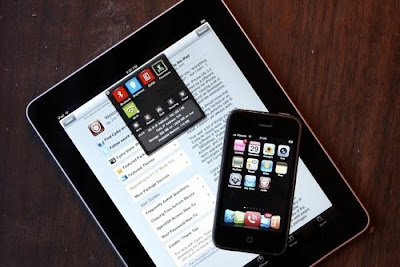
So, you've heard about jailbreaking, and it sounds intriguing. And dangerous. (But mostly just intriguing.) Here's how to hack your iPhone, iPod Touch or iPad—yes, iPad—into an unrestricted, freshly empowered mega-machine.
Jailbreaking: The What and the WhyIn buying an iProduct, you're accepting that its fate will be dictated by Apple. They control what kind of apps you install on your device, which of the hardware functions you can exploit to their full potential, and which carrier you can use your iPhone with. They've loosened up on at least one of those fronts in the last year or so, expanding the types of apps available in the App Store, but many—screw that, most—of the same restrictions still apply. Want to install an app that Apple hasn't explicitly approved? Sorry. Want to use an app over 3G that's been designated for Wi-Fi? Nope. Want to tether your phone? Run applications in the background? Change your device theme? Install system-wide gestures? No. Such. Luck.
Enter jailbreaking. In technical terms, to jailbreak is to enable a device to run code, meaning programs or system modifications, that hasn't been sanctioned by Apple. Its roots reach back to a time when there were no apps for iPhone OS, and a clever group of hackers zeroed in on some exploits gave people their first way to install apps on their devices, by way of an underground App Store called Installer. It used to be that you could hack your device simply by visiting a webpage. That was two years ago. Since then, the iPhone and iPod Touch have been given a legit App Store, Apple has closed one security hole after another, and jailbreaking has become alternately more and less difficult, depending which device and software version you have.
But just last week, a Windows and Mac tool called Spirit was released to the world. It's simple, relatively safe, and finally, works on all devices. Every iPod Touch can now be jailbroken to run custom apps. Every iPhone, too. Even the brand new iPad can be hacked. Theming, data tethering, multitasking, console emulation, secret settings, and yes, you filthy thief, even pirated apps: With jailbreak, your iThing is truly yours.
Here's how to jailbreak (or in the case of phones, unlocked) any iPod Touch, iPhone or iPad, using the new Spirit tool. But first, a disclaimer:
When you jailbreak or unlock a device, you're chaining some fundamental aspects of the system software—you know, real low-level stuff. The tools are generally good, and if you follow directions carefully, you should be fine. But if something goes wrong—and there is more than one way this can happen—you can suffer data loss, or even brick your phone. Even worse, Apple claims that jailbreaking voids your warranty. You can restore your device to remove evidence that it ever happened, but if the device goes down while jailbroken, you could well be stuck. In addition, jailbreaking does not jibe with the DMCA, and breaks relate license agreements.
To the point: Follow this guide at your own peril, know that there's risk and be careful. Consult elsewhere if you're nervous, or worry that I've missed something.
How To JailbreakThe Spirit tool has made the jailbreak fairly simple, but there's still room for error. Step by step:
 What You Need:
• Spirit Jailbreak Tool (Windows and Mac)
• iTunes 9.x (Latest confirmed working version: 9.1.1)
• iPod cable
• An iPod, iPhone or iPod Touch that a.) Isn't currently jailbroken (obvious, but just in case), b.) is working, i.e. not stuck in a startup loop, or displaying that "Connect to iTunes" screen and c.) is running a device software version 3.1.3 or lower (or in the case of the iPad, version 3.2)
1. Plug your device in, so that it's recognized by iTunes
2. Back up your device to your iTunes library, and sync it. Having the backup handy will allow to you restore your settings in case you need to wipe your device later; syncing everything—including photos, which some users report losing during the jailbreak process—ensures that all the media on your device will remain untouched, or at least restorable.
3. Open the Spirit Jailbreak tool. It will open in a small window, and should display a message like "iPad (3.2) Connected." If not, disconnect and reconnect your device, and open the tool again.
4. Click "Jailbreak"
5. During the jailbreak routine, don't interfere with the device. It's probably better to leave your computer alone as well, to avoid a crash at a critical moment. First, you should see a screen on the device that says "Restore Complete." The device will restart, display a spinning pinwheel icon, and open up a colorful screen like this, with a progress bar:

Spirit should be done doing its thing in under 30 seconds. Your device should then boot up to your homescreen, as it was before—same background, same apps, same settings. Now you're jailbroken. But there's one more thing:
6. When you restart your device, you'll see a new icon on your homescreen, called Cydia. Open it up. This is your new App Store. Don't worry, the regular App Store still works. Now you've just got another one.
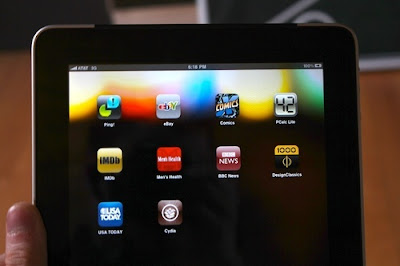
Cydia will look a bit different on the iPad and iPhone or iPod Touch, but will contain most of the same software.

The first thing you need to do, though, is click the button that says, "Make my life easier, thanks!"
This will back up your device activation profile (called an SHSH blob) to remote servers, which ensures that you won't lose the ability to jailbreak if you accidentally upgrade your device device software in the future. More on that later.
Regarding UnlockingTraditionally, unlocking (opening your phone to use with different carriers) and jailbreaking have fallen to the same tools. Since unlocking has become more difficult with later firmwares, the tools have grown apart. Spirit doesn't unlock. If you want to unlock, though, there may be hope.
If you haven't upgraded your iPhone to firmware 3.1.3, or can downgrade to an earlier build, you can use the Pwnage Tool, located here. The process is self-guided and quite similar to using Spirit. Unlocking is a comparatively narrow concern, and can get much more complicated, so I'll leave it at that. More info here.
Anyway, that's it! It's time to explore Cydia.
What to DownloadNow that you're jailbroken, it's time to start downloading apps. Here are a handful of must-tries to get you started:

• Backgrounder: Lets you run apps in the background, full stop. Perhaps my top reason to jailbreak, period. The latest version lets you set apps to run in the background with a huge variety of gestures.
• Activator: Speaking of gestures, this provides a framework for all kinds of gestures across jailbroken apps. (iPad and iPhone)
• Kirikae: A task switcher to be used with Backgrounder. (Think alt+tab) (iPhone)
• SBSettings: This opens up a whole slew of settings, accessible at any time via a pop-down system tray. Adjust brightness, toggle Wi-Fi, whatever. (iPad and iPhone)
• Cycorder: Lets you take full-motion video with your pre-3GS iPhone. (iPhone)
• MyWy: Lets you share your 3G connection with other devices over Wi-Fi. It's paid software, but a trial is available. (iPhone and iPad 3G)
• Winterboard: Lets you change themes, and install a lot of interesting modifications to your device's homescreen, including folders, different icon arrangements, widgets and more.
• iRealSMS: Lets you send text messages without opening the SMS app. (iPhone)
• VoIPOver3G: Tricks apps into thinking they're connected over Wi-Fi, even if they're connected to 3G. (iPhone, iPad 3G)
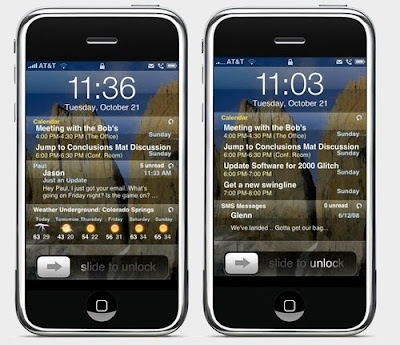
• Intelliscreen: Puts all kinds of useful information on your lock screen, from weather to email to calendar events. Another paid app, but one that will be worth it to a lot of people. (iPhone)
• Console emulators: Do your own searching on this one; there's one for virtually ever console released pre-2000, and many have different approaches to controls, and acquiring games. Some, like those by ZOTDD, actually let you search for and download ROMs from within the app. (iPhone and iPad)
• Veency: A VNC server. No, not a client—a server. Control your iPhone from your computer. (iPhone)
• Illicit goods: They're there, but I won't tell you how to find them. Pay for your apps! Trying before you buy is only a conscionable excuse if it's actually true.
Some general observations: Right now, a lot of apps haven't been updated for the iPad, so it's worth doing a little Googling to see how they handle the subtle changes in the new OS. That said, most apps do work, although if you experiment enough, you'll eventually get burned and have to restore your OS and start over, losing whatever tweaks you've made in the jailbreak process.
Un-JailbreakingIf you've decided the jailbreak lifestyle isn't for you, or managed to screw up your device software enough that you want to switch back, it's easy. (Also, if Apple will be handling your device for any reason, you should probably un-jailbreak it. Warranties!)
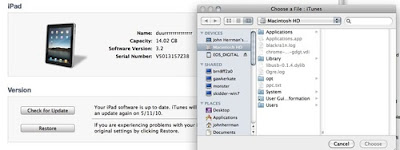
All you need is your device's latest firmware file, helpfully linked here.
Oh, and make sure you've backed up—you're going to lose everything.
(This guide only applies to software versions 3.1.3 for the iPhone and iPod Touch, and 3.2 for the iPad. These are the latest versions at the time of posting, and newer software could break compatibility.)
1. Plug your device in, and open iTunes
2. Shift-click (Windows) or Option-click the "Restore" button in your iTunes device summary page. Navigate to the firmware you've downloaded, and restore.
3. Once this is done, iTunes will ask you if you want to set up your device as a new device, or from a previously stored backup. If your goal is to return to a life before jailbreak, you're probably going to want to restore.
And that's it!! Enjoy!!
FAQWhat are the Downsides?As mentioned before, there is a real risk of bricking your device, or losing data. But beyond that, there are stability issues with some jailbreak apps, and using apps like Backgrounder can seriously diminish your battery life. Also, flaunting your new found ability to tether your phone by running, say, torrents through your 3G connection is a good way to get in trouble with your carrier.
What about future software upgrades?Apple's software updates almost always break jailbreak. When they come out, hold off on upgrading until the jailbreak community develops a hack, or an upgrade path. Upgrading to new software versions after a jailbreak often means installing a patched version of the update, specifically for jailbreakers.
Why did I click that "Make My Life Easier" button?If Apple does thwart jailbreak in its next software update (likely), and you accidentally upgrade, you could be locked out of jailbreaking forever. Seriously! Why? Because as of late, Apple has been cracking down on jailbreakers by forcing their devices to authenticate with official servers every time they're upgraded or downgraded.
What this prevents, specifically, is restoring to older versions of the iPhone/iPad software, which contain the security holes necessary for jailbreaking. By keeping users from downgrading, Apple essentially locks them out of jailbreaking once they've upgraded to an un-jailbreakable OS.
The button you pressed in Cydia remotely saves what's called an SHSH blob, which is the "Go!" signal passed from Apple's servers to your specific device. In the event of a later downgrade, iTunes can be spoofed into thinking that Apple has approving the device's software change, when in fact it's just the Cydia store's servers giving the green light. The downgrade process is something we won't have to worry about until Apple issues another update, after which I'll update this guide. Until then, you can get a rough idea of how this whole thing by reading Saurik's (the guy behind Cydia) blog post on how it works.
Will It Work With OS 4.0?Surprisingly, yes! OS 4.0 builds seem to respond well to jailbreaking with the Spirit tool. That said, this software is already fairly precarious, so I'm not sure I would risk it. Update: Turns out I was wrong. The Spirit jailbreak tool doesn't yet work on 4.0. They're working on it.
In the Event of Emergency, Who Can Help?Google. But no, seriously, Google. Another great resource is the ModMyi forums, where just about any question you can have has probably already been asked, and answered.


